
VIN Decoder & Vin check
Vin CheckAuto & Vehicles
4.763.00 Reviews
- Version
- 1.2.5
- Installs
- 100.00K
- Age Rating
- Everyone
Screenshots


Our Review of VIN Decoder & Vin check
 Analysis by Appyee
When I am standing beside a used car, the first challenge is often knowing what the vehicle actually is, beyond the seller’s description. That is where VIN Decoder & Vin check can be useful: it gives me a way to start with the identification number rather than relying only on a listing or a quick conversation. I see it as a practical first step for checking a car, not a substitute for a mechanic’s inspection or careful paperwork review.
A focused tool for checking a vehicle
This is an auto and vehicles app from Vin Check, built around decoding and checking a vehicle identification number. Its current version is 1.1.2, and the app is free to install, with in-app purchases listed from $3.99 to $38.99 per item. It has a 4.5 average from around 1,100 ratings and more than 100,000 installs, which suggests that many people have tried it, though popularity alone cannot tell me whether a particular report will answer every question I have about a specific vehicle.
The basic appeal is straightforward: a VIN is a fixed identifier, while a seller’s wording can be incomplete or mistaken. I would use the app to get oriented before asking more detailed questions, especially when I am comparing several cars and want a consistent starting point for each one. It is intended for everyone and runs on Android 5.0 or later, making it accessible on a broad range of Android devices.
Getting to Know the App
The first thing I noticed about the VIN Decoder & Vin Check app is its super clean and intuitive interface. You know how some apps just overwhelm you with buttons and options? Not this one. It’s designed with simplicity in mind, which is perfect for those of us who just want to get straight to the point. So, what does it do, you ask? Well, at its core, it allows you to decode the VIN (Vehicle Identification Number) of any car. This is like uncovering a car’s birth certificate. Cool, right?
How It Works
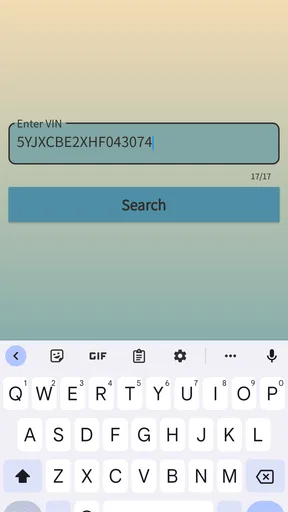
Using the app is as easy as pie. Once you open it, you’ll be prompted to enter the VIN number of the car you’re curious about. If you’re wondering where to find that, it’s usually on the dashboard or inside the driver-side door. After punching in the number, the app works its magic and displays a treasure trove of information about the vehicle.
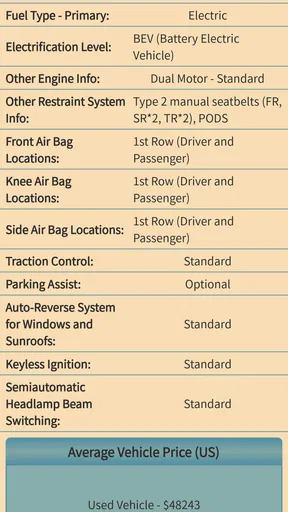
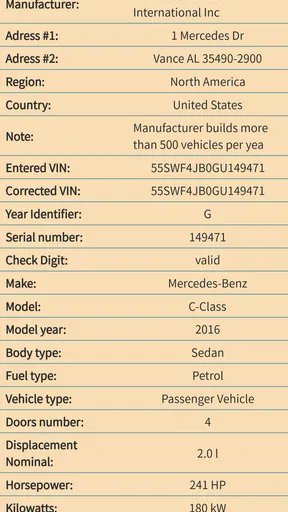
You’ll find details like the car’s make, model, year, engine type, and even the manufacturing plant. I was amazed at how much you can learn from just a string of numbers and letters. It’s like being a detective in the world of automobiles!
Checking before a purchase
For a realistic example, imagine I have arranged to see a used car after work and only have a short window to decide whether it deserves a closer look. I can enter the VIN before I go, then compare the decoded identity with the seller’s description and the documents presented in person. If the details do not line up, I have a concrete reason to pause and ask questions instead of making a decision based on a polished advert.
There is a useful distinction here: decoding a VIN and establishing a full vehicle history are not the same job. A decoder can help identify a vehicle, but I would not treat a screen result as proof that the car has never been damaged or that every record is complete. For a purchase, I would pair the app with a physical inspection, a test drive, and checks of the vehicle’s paperwork. If the decision involves a large amount of money, a professional inspection or a more comprehensive history service may be the better next step.
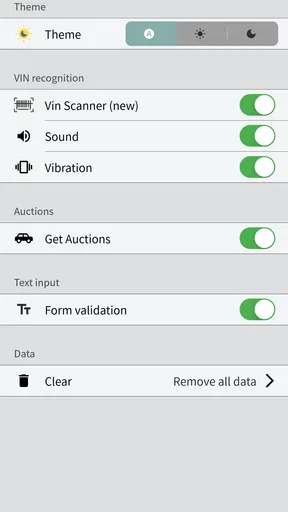
A small workflow tip makes the check more useful: photograph or copy the VIN from the vehicle itself, then compare it with the number on the documents rather than relying on a number sent in a message. That helps avoid checking the wrong car by mistake. I would also enter the number carefully; a single mistyped character can lead to a failed lookup or make the result irrelevant. If the app offers a scanner or recognition option on the device, that can reduce typing, but I would still visually verify the captured characters before trusting the result.
The Nitty-Gritty Features
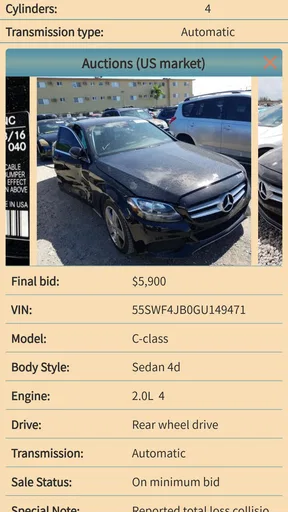
One of the standout features of this app is the vin check function. This part of the app dives deeper, giving you insights into any past accidents, title changes, or recalls associated with the vehicle. Imagine the peace of mind this can bring, especially if you’re in the market for a used car. You’ll know exactly what you’re getting into, avoiding any nasty surprises down the road.
Another cool aspect is the app’s ability to save your searches. This means if you’re checking out multiple vehicles, you can easily compare them without having to re-enter information. It’s these little conveniences that make the app a joy to use.
Making saved checks work harder
Saved searches are most helpful when I treat them as a shortlist, not as a final verdict. If I am weighing two cars, I can keep the checks together and revisit the identifying details while I compare their condition, seller explanations, and paperwork. I would make a separate note of questions raised by each result, because a saved VIN lookup cannot record what I saw during a test drive or what the seller told me.
There is also a practical privacy trade-off with any saved vehicle information: I would avoid treating a phone full of checks as a complete buying record, particularly if I am checking cars on behalf of someone else. Keep only what is useful, and make sure the VIN belongs to the vehicle being discussed before sharing a screenshot or result. The app’s convenience is in quick reference; it does not remove the need to handle identifiers thoughtfully.
How it compares with other ways to check
Compared with manually searching the web, a dedicated VIN tool gives me a more focused place to begin and can spare me from piecing together basic vehicle identity details across several pages. Compared with a paid history report, it is better viewed as an initial screening step: a paid service may be more appropriate when I need a fuller record or more coverage before committing to a purchase. A visit to a mechanic answers a different question again, because a database lookup cannot reveal every current mechanical problem.
I would not choose a VIN app as the only check when buying a car, and I would be cautious about assuming that an accident or recall result is exhaustive. Records can vary in coverage, and a clean-looking result is not a guarantee of a clean history. If the app’s result prompts a concern, I would ask the seller for supporting documents and verify important points through an appropriate independent source rather than trying to settle the matter from one screen.
Where it fits—and where it does not
This is a good fit for a curious owner, someone browsing used-car listings, or a buyer who wants a quick identity check before spending time on a viewing. It can also help me prepare sharper questions: whether the vehicle description matches the decoded details, or whether I should ask for clarification about a discrepancy. The app is less suitable for someone who expects a single scan to certify a car’s condition, confirm its entire history, or replace an expert inspection.
For a seller, it can be a handy way to check that the vehicle is being described consistently, but I would not rely on it to create a complete sales dossier. For a mechanic or experienced buyer who already uses several specialist sources, it may serve mainly as a convenient first check rather than a full professional workflow. In other words, its value depends on using it at the right point: early enough to guide questions, not as the last word before handing over money.
Why You’ll Love It
So, why should you download this app? Well, apart from being a car nerd’s dream, it’s incredibly useful for anyone looking to buy, sell, or just learn more about cars. The app’s ability to provide detailed vehicle history is invaluable, especially in the used car market where every detail counts.
The app also doesn’t bombard you with ads, which is a huge plus in my book. It’s just you and the information you need. And if you’re worried about data accuracy, the app sources its information from reliable databases, ensuring that what you see is legit.
Version, cost, and what to keep in mind
The app was released on March 25, 2024, and its current version remains 1.1.2. That gives me a clear sense of the release and version available now, but a version number by itself does not tell me what changed between releases. I would judge any future evolution by the practical things that matter during a check: whether VIN entry and scanning are dependable, whether the result is easy to interpret, and whether saved searches remain useful for comparing vehicles.
Although the app is free to install, the listed in-app purchases range from $3.99 to $38.99 per item. Before paying for anything, I would look closely at what a purchase covers and whether it is needed for the particular check I am doing. If all I want is a basic starting point, I would first see what is available without paying; if I need deeper information for a serious purchase, I would compare the scope and cost with other history-check options rather than assume that a paid item automatically answers every question.
For everyday use, I would keep the process simple: locate the VIN on the car, confirm it against the documents, enter or scan it, and use the result to shape follow-up questions. If a lookup does not work, I would recheck the characters and try again before concluding anything about the vehicle. A failed or incomplete result is a reason to verify, not a reason to guess.
Wrapping It Up
In conclusion, the VIN Decoder & Vin Check app is a must-have tool for anyone interested in cars. Whether you’re a buyer, seller, or just a curious soul, this app provides a wealth of information right at your fingertips. It’s easy to use, reliable, and best of all, it gives you a peek into the secret life of cars. So go ahead, give it a whirl, and unlock the stories behind the vehicles you love!
My more measured recommendation is to use it as a convenient first checkpoint, then corroborate anything important before acting on it. That balance is what makes a VIN decoder worthwhile: it can help me spend my time wisely and ask better questions, while leaving the inspection, documentation, and final decision to the checks they require.
Verdict
Strengths of VIN Decoder & Vin check
- Comprehensive vehicle history reports.
- User-friendly interface for easy navigation.
- Quick VIN scanning via camera.
- Includes recall and safety information.
- Supports multiple vehicle types.
Limitations of VIN Decoder & Vin check
- Requires internet for full features.
- Limited free report access.
- Occasional ads in free version.
- Some data may be outdated.
- Premium features can be pricey.
Similar Picks in This Category
View All
Android Auto
Google LLC4.1

maxim — order a taxi & food
PT. SITO4.7

Штрафы ГИБДД: проверка с фото
Pays LLC – Штрафы ГИБДД4.7

Номерограм – проверка авто
Авто Ассист4.8

Дром Авто
Дром4.9

Frequently Asked Questions
What is VIN Decoder & VIN Check and how does it work?
VIN Decoder & VIN Check is an app designed to provide detailed information about vehicles using their Vehicle Identification Number (VIN). By inputting the VIN, the app retrieves data such as the car's make, model, year, engine type, and more. This helps potential buyers or current owners verify the vehicle's history and specifications.
Is the VIN Decoder & VIN Check app free to use?
The app offers a basic free version allowing users to access essential vehicle information. However, for more comprehensive reports, such as accident history or detailed service records, in-app purchases or a subscription may be required. Users should check the app store description for specific pricing details.
How accurate is the information provided by VIN Decoder & VIN Check?
The app sources its data from reputable databases and industry-standard sources, ensuring high accuracy. However, it is always recommended to cross-reference the app’s data with official documents or consult a professional when making critical decisions based on the information provided.
Can I use the VIN Decoder & VIN Check app for any vehicle type?
Yes, the app is versatile and supports a wide range of vehicles, including cars, trucks, motorcycles, and more. As long as the vehicle has a valid 17-character VIN, the app can decode it and provide the necessary information. Check the app’s compatibility for older models or international vehicles.
Is my data secure when using the VIN Decoder & VIN Check app?
The app prioritizes user privacy, implementing robust encryption to protect any personal information entered. It does not store VINs or personal data unless explicitly stated. Users should review the privacy policy for detailed information on data handling and security measures.
